
AutoReels Alternative
Discover why EasyVid is a stronger choice for AI video creation, offering more control and a faster workflow than AutoReels.
Create a videoSummary
AutoReels is a faceless video generator that writes, narrates and illustrates short videos on a topic you choose, then schedules and auto-posts them to TikTok, YouTube, Instagram and Facebook as a series. It offers a wide range of AI art styles, narration voices and background music, and it is built to keep a channel posting without daily work. EasyVid is built for a different job: turning one script into one finished, longer story video. If you're exploring alternatives to AutoReels, EasyVid might be what you're looking for. Start from a prompt or script, then refine scenes in the storyboard.
Product Ad Demo
Generate a product ad from a prompt and attached assets, then refine scenes in the storyboard before rendering.
Prompt or Script to Video
Generate a full first cut, then refine scene-by-scene in the storyboard.
Scene-by-Scene Control
Edit prompts, swap frames, and iterate quickly without rebuilding your workflow.
Consistent Characters
Keep characters consistent across scenes so your video stays coherent.
Reference Images
Use reference assets to guide style and keep visuals on track.
Video prompt
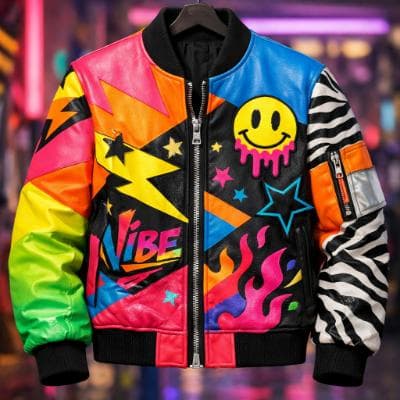
Make an ad for Splash Jackets. Feature the attached jacket and logo.
Attached assets


Why EasyVid Outperforms AutoReels
One finished story vs. a posting series
AutoReels generates a steady stream of narrated shorts and publishes them for you, keeping each one within the recommended length for the platform. EasyVid takes a single script and renders it as one complete 3 to 10 minute video, so it suits a YouTube episode, short film or explainer rather than a daily feed.
Characters that carry through every scene
In EasyVid, every character, location and prop in the script becomes a reusable asset, so the same face, outfit and setting appear from scene to scene, including different outfits, lighting and camera angles. That matters when a video follows the same people through a story instead of illustrating a narration with standalone images.
Dialogue and animated scenes
AutoReels videos are narrated over AI-generated visuals. EasyVid splits the script into scenes with characters and dialogue, gives each character an HD voice with emotion and tone control, and animates scenes with video models such as Seedance and MiniMax, which you pick per scene.
Why AutoReels Users Try EasyVid
Longer videos from one script
Creators who want a single 3 to 10 minute video, such as a YouTube story or episode, rather than a queue of short posts.
Recurring characters
Stories with the same characters and places across many scenes, where consistent faces and settings keep the video coherent.
Scene-by-scene control
Anyone who wants to review a storyboard, adjust individual scenes and choose the video model for each one before the final render.