
Lumen5 Alternative
Discover why EasyVid is a stronger choice for AI video creation, offering more control and a faster workflow than Lumen5.
Create a videoSummary
Lumen5 turns blog posts, PDFs and other text into videos. Its AI drafts a script, pairs each scene with stock photos and clips from its media library, and adds AI voiceover, templates and brand kits. It is built for marketing and communications teams repurposing written content. If you're exploring alternatives to Lumen5, EasyVid might be what you're looking for. Start from a prompt or script, then refine scenes in the storyboard.
Product Ad Demo
Generate a product ad from a prompt and attached assets, then refine scenes in the storyboard before rendering.
Prompt or Script to Video
Generate a full first cut, then refine scene-by-scene in the storyboard.
Scene-by-Scene Control
Edit prompts, swap frames, and iterate quickly without rebuilding your workflow.
Consistent Characters
Keep characters consistent across scenes so your video stays coherent.
Reference Images
Use reference assets to guide style and keep visuals on track.
Video prompt
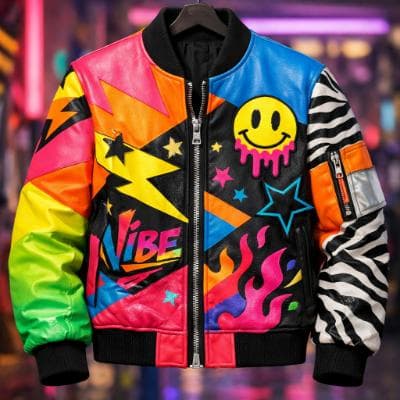
Make an ad for Splash Jackets. Feature the attached jacket and logo.
Attached assets


Why EasyVid Outperforms Lumen5
Generated scenes vs. stock media
Lumen5 matches each scene with stock footage, which works well for general business topics. EasyVid does not use stock libraries: every scene is generated for your script, so it can show your specific characters, places and moments.
Characters that carry through the video
EasyVid turns every character, location and prop in the script into a reusable asset, including variants for different outfits, lighting and camera angles. The same people appear in every scene they are in, which stock footage cannot do.
Stories and animation, not only slides
Lumen5's templates are designed around text on screen over footage. EasyVid animates each scene with a video model you choose, such as Seedance or MiniMax, in styles such as Photorealistic, Anime, 3D Animation or Cartoon, and gives each character an HD voice with emotion and tone control.
Why Lumen5 Users Try EasyVid
Your topic has no stock footage
Fiction, historical stories and niche subjects get visuals generated for the script instead of the closest available clip.
You need recurring characters
Narrative videos, series and micro-dramas keep the same cast looking the same from scene to scene.
Dialogue, not just narration
Each character gets its own voice, with auto-synced subtitles and your own background music in the final render.