
FlexClip Alternative
Discover why EasyVid is a stronger choice for AI video creation, offering more control and a faster workflow than FlexClip.
Create a videoSummary
FlexClip is an online video editor with thousands of templates, a large stock library of videos, photos and music, and AI tools for text to speech, auto subtitles, script writing and generating videos from a prompt or article. It works well for marketing videos, slideshows and social clips that you customize from a template. EasyVid is built around generating an original story from a script, with the same characters in every scene. If you're exploring alternatives to FlexClip, EasyVid might be what you're looking for. Start from a prompt or script, then refine scenes in the storyboard.
Product Ad Demo
Generate a product ad from a prompt and attached assets, then refine scenes in the storyboard before rendering.
Prompt or Script to Video
Generate a full first cut, then refine scene-by-scene in the storyboard.
Scene-by-Scene Control
Edit prompts, swap frames, and iterate quickly without rebuilding your workflow.
Consistent Characters
Keep characters consistent across scenes so your video stays coherent.
Reference Images
Use reference assets to guide style and keep visuals on track.
Video prompt
Make an ad for Splash Jackets. Feature the attached jacket and logo.
Attached assets

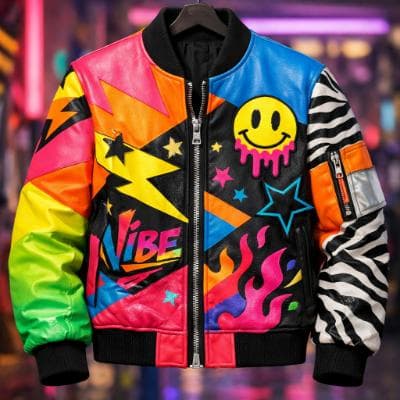

Why EasyVid Outperforms FlexClip
Generated scenes instead of stock clips
FlexClip videos are typically built from templates and stock media that you pick and arrange. EasyVid generates every scene to match what your script describes, so the visuals show your characters and your locations rather than footage that only loosely fits the words.
Characters that stay consistent
Every character, location and prop in an EasyVid script becomes a reusable asset. The same face, outfit and setting carry through the whole video, including different outfits, lighting and camera angles, which is what a narrative with recurring characters needs.
Built for 3 to 10 minute stories
EasyVid splits a script into scenes, animates them with video models such as Seedance and MiniMax, voices each character with an HD voice, and adds subtitles and your music in one render. FlexClip gives you more manual layout control; EasyVid is aimed at finishing a full story video from one script.
Why FlexClip Users Try EasyVid
Original visuals for a story
Creators whose scripts describe specific characters and places that stock libraries do not have.
Less time arranging media
People who would rather review and adjust a generated storyboard than search for clips and fit them into a template.
Choice of visual style
Projects that need a consistent look across every scene, such as Photorealistic, Anime, 3D Animation, Cartoon, Claymation or a custom style.