
VEED Alternative
Discover why EasyVid is a stronger choice for AI video creation, offering more control and a faster workflow than VEED.
Create a videoSummary
VEED is a browser-based video editor with a broad set of AI tools: automatic subtitles, noise and background removal, screen and webcam recording, AI avatars, voice cloning and translation. It also gives access to AI video models such as Veo, Kling, Sora and Seedance for generating clips from text or images. It is a strong all-round editor for marketing, social and UGC content. EasyVid is focused on one workflow: turning a script into a complete story video. If you're exploring alternatives to VEED, EasyVid might be what you're looking for. Start from a prompt or script, then refine scenes in the storyboard.
Product Ad Demo
Generate a product ad from a prompt and attached assets, then refine scenes in the storyboard before rendering.
Prompt or Script to Video
Generate a full first cut, then refine scene-by-scene in the storyboard.
Scene-by-Scene Control
Edit prompts, swap frames, and iterate quickly without rebuilding your workflow.
Consistent Characters
Keep characters consistent across scenes so your video stays coherent.
Reference Images
Use reference assets to guide style and keep visuals on track.
Video prompt
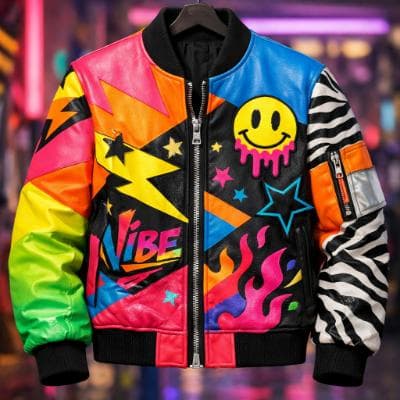
Make an ad for Splash Jackets. Feature the attached jacket and logo.
Attached assets


Why EasyVid Outperforms VEED
A whole video, not individual clips
VEED's AI models generate clips of around 10 seconds that you then assemble in its editor. EasyVid splits your script into scenes, generates and animates every scene, adds voices, subtitles and your background music, and renders one complete video, typically 3 to 10 minutes long.
Characters that stay the same between scenes
When clips are generated one prompt at a time, keeping a character's face and outfit identical across a story is up to you. EasyVid turns each character, location and prop into a reusable asset and uses it in every scene, including different outfits, lighting and camera angles.
Story structure handled for you
VEED is a flexible editor, so the timeline, pacing and shot choices are yours to build. EasyVid writes or formats the script into scenes with characters, locations and dialogue, voices each character with emotion and tone control, and lets you pick the video model, such as Seedance or MiniMax, per scene.
Why VEED Users Try EasyVid
Long-form stories
Creators producing multi-minute story videos can go from a script to a finished render without assembling dozens of separate clips by hand.
Consistent characters
Series and short films need the same cast in every scene, which EasyVid keeps through reusable character and location assets.
Less manual editing
People who do not want to work on a timeline can review and adjust scenes on a storyboard instead, while VEED remains a good choice for editing recorded footage.