
HeyGen Alternative
Discover why EasyVid is a stronger choice for AI video creation, offering more control and a faster workflow than HeyGen.
Create a videoSummary
HeyGen is an AI video platform built around talking avatars. You can create a digital twin or choose a stock avatar, have it present a script with lip-synced speech in more than 175 languages, translate existing videos, and use its Video Agent to turn a prompt into a presenter-led video with B-roll and motion graphics. It is a strong choice for training, course content, sales outreach and localized marketing. If you're exploring alternatives to HeyGen, EasyVid might be what you're looking for. Start from a prompt or script, then refine scenes in the storyboard.
Product Ad Demo
Generate a product ad from a prompt and attached assets, then refine scenes in the storyboard before rendering.
Prompt or Script to Video
Generate a full first cut, then refine scene-by-scene in the storyboard.
Scene-by-Scene Control
Edit prompts, swap frames, and iterate quickly without rebuilding your workflow.
Consistent Characters
Keep characters consistent across scenes so your video stays coherent.
Reference Images
Use reference assets to guide style and keep visuals on track.
Video prompt
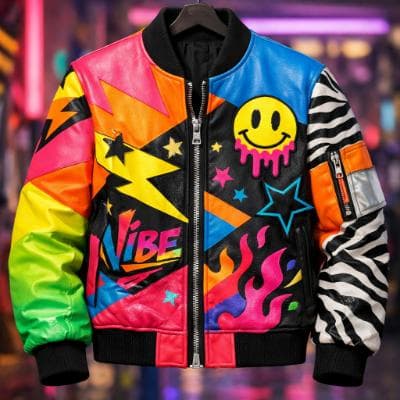
Make an ad for Splash Jackets. Feature the attached jacket and logo.
Attached assets

Why EasyVid Outperforms HeyGen
A presenter vs. a cast of characters
HeyGen videos center on an avatar speaking to the viewer. EasyVid is built for stories: it splits your script into scenes with characters, locations and dialogue, and each character becomes a reusable asset that keeps the same face and outfit from scene to scene while acting inside the story.
Every scene generated for the script
In HeyGen, visuals usually support the presenter. EasyVid generates each scene from your script in one visual style, such as Photorealistic, Anime, 3D Animation or Claymation, then animates it with a video model you pick per scene, such as Seedance or MiniMax.
Voices for dialogue between characters
HeyGen's voice tools are strong for a single speaker, including voice cloning and translation. EasyVid gives each character its own HD voice with emotion and tone control, so conversations play as dialogue, and adds auto-synced subtitles and your own background music in the final render.
Why HeyGen Users Try EasyVid
You are telling a story, not presenting
Creators making short films, animated stories or narrative YouTube videos get scenes with a recurring cast instead of a talking head.
One script, one finished video
EasyVid takes a script through scenes, animation, voices, subtitles and music, and renders one complete video, typically 3 to 10 minutes long.
You want a stylized look
Anime, cartoon, claymation and 3D animation styles apply across every scene, which suits content where a realistic presenter would feel out of place.