
Google Flow Alternative
Discover why EasyVid is a stronger choice for AI video creation, offering more control and a faster workflow than Google Flow.
Create a videoSummary
Google Flow is Google's AI filmmaking tool built around their models (like Veo, Imagen, and Gemini). It's great for experimenting with shots and clips, but many teams want a faster path from prompt or script to a complete video with editing control—this is where EasyVid shines. If you're exploring alternatives to Google Flow, EasyVid might be what you're looking for. Start from a prompt or script, then refine scenes in the storyboard.
Product Ad Demo
Generate a product ad from a prompt and attached assets, then refine scenes in the storyboard before rendering.
Prompt or Script to Video
Generate a full first cut, then refine scene-by-scene in the storyboard.
Scene-by-Scene Control
Edit prompts, swap frames, and iterate quickly without rebuilding your workflow.
Consistent Characters
Keep characters consistent across scenes so your video stays coherent.
Reference Images
Use reference assets to guide style and keep visuals on track.
Video prompt
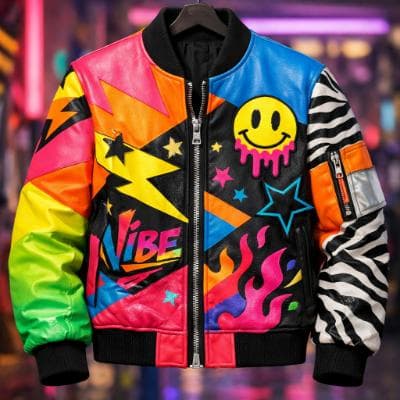
Make an ad for Splash Jackets. Feature the attached jacket and logo.
Attached assets

Why EasyVid Outperforms Google Flow
Full script to video conversion
EasyVid can take a prompt or script and generate a full first cut—then you can refine scene-by-scene in the storyboard. This is ideal when you want a complete video quickly, not just isolated clips.
Built for iteration and control
EasyVid is designed for practical iteration: update prompts, swap frames, adjust scenes, and re-render without rebuilding your workflow each time.
Flexible models and inputs
EasyVid supports multiple AI models and workflows, including reference images and consistent characters—so you can pick what works for your style and budget.
Why Google Flow Customers Switch to EasyVid
Complete Script Processing
"With EasyVid, I can paste a script and get a complete first cut, then iterate in the storyboard. It feels much faster than building everything from scratch."
Storyboard Editing
"I like being able to tweak prompts and scenes without breaking my flow. The storyboard keeps everything organized."
More Control Over Inputs
"Reference images and consistent characters make it easier to keep a cohesive look across scenes."