
Google Sparkify Alternative
Discover why EasyVid is a stronger choice for AI video creation, offering more control and a faster workflow than Google Sparkify.
Create a videoSummary
Sparkify is an experiment from Google Labs that uses Gemini and Veo to turn a question or topic into a short animated explainer video, with a choice of visual styles. It is designed to make a concept easy to understand in a couple of minutes, and access has been limited to a waitlist. EasyVid is a publicly available tool built for turning a full script into a longer story video. If you're exploring alternatives to Google Sparkify, EasyVid might be what you're looking for. Start from a prompt or script, then refine scenes in the storyboard.
Product Ad Demo
Generate a product ad from a prompt and attached assets, then refine scenes in the storyboard before rendering.
Prompt or Script to Video
Generate a full first cut, then refine scene-by-scene in the storyboard.
Scene-by-Scene Control
Edit prompts, swap frames, and iterate quickly without rebuilding your workflow.
Consistent Characters
Keep characters consistent across scenes so your video stays coherent.
Reference Images
Use reference assets to guide style and keep visuals on track.
Video prompt
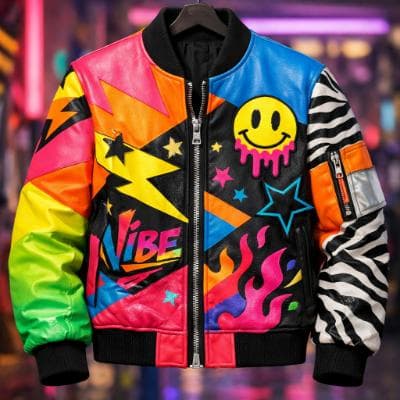
Make an ad for Splash Jackets. Feature the attached jacket and logo.
Attached assets

Why EasyVid Outperforms Google Sparkify
Your script vs. a generated explanation
Sparkify writes its own explanation from a question you ask. EasyVid can write a script from an idea too, but it is built to take your finished script and break it into scenes with characters, locations and dialogue, so the video follows your words.
Stories with recurring characters
EasyVid turns every character, location and prop into a reusable asset, so the same faces, outfits and settings carry through every scene. Each character gets an HD voice with emotion and tone control, which suits narratives and dialogue rather than single-topic explainers.
Available now, with control over each scene
EasyVid is open to anyone and renders complete 3 to 10 minute videos. You can review the storyboard, change individual scenes and pick the video model, such as Seedance or MiniMax, for each one before the final render.
Why Google Sparkify Users Try EasyVid
Narrative scripts
Creators with a story, lesson or episode already written who want it turned into scenes as written.
No waitlist
Anyone who wants to start a project today rather than wait for access to an experiment.
Longer finished videos
Projects that need a complete 3 to 10 minute video with voices, subtitles and background music in one render.