
Leonardo Alternative
Discover why EasyVid is a stronger choice for AI video creation, offering more control and a faster workflow than Leonardo.
Create a videoSummary
Leonardo.Ai, owned by Canva, is an AI image generator that has grown into a broader creative suite. It offers its own image models, video generation through models such as Veo, Kling and Sora, image editing tools and an API. It is a strong choice for concept art, product visuals and individual clips. If you're exploring alternatives to Leonardo, EasyVid might be what you're looking for. Start from a prompt or script, then refine scenes in the storyboard.
Product Ad Demo
Generate a product ad from a prompt and attached assets, then refine scenes in the storyboard before rendering.
Prompt or Script to Video
Generate a full first cut, then refine scene-by-scene in the storyboard.
Scene-by-Scene Control
Edit prompts, swap frames, and iterate quickly without rebuilding your workflow.
Consistent Characters
Keep characters consistent across scenes so your video stays coherent.
Reference Images
Use reference assets to guide style and keep visuals on track.
Video prompt
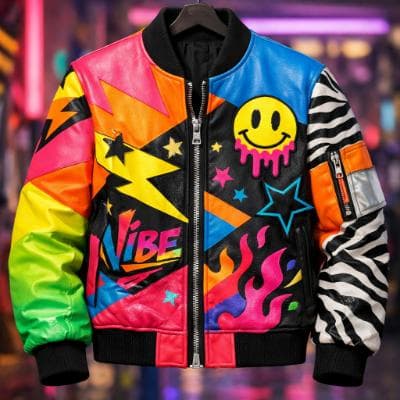
Make an ad for Splash Jackets. Feature the attached jacket and logo.
Attached assets


Why EasyVid Outperforms Leonardo
Single generations vs. a finished video
Leonardo.Ai produces one image or clip per generation, and you combine them elsewhere. EasyVid starts from a script, generates and animates every scene, and renders one complete video with voices, subtitles and music.
Consistency driven by the script
EasyVid reads your script and turns every character, location and prop into a reusable asset, including variants for different outfits, lighting and camera angles. Each scene is generated from those assets, so the same cast and places appear throughout without re-prompting them each time.
Audio in the same project
EasyVid gives each character an HD voice with emotion and tone control, syncs subtitles automatically and mixes in your own background music. Leonardo.Ai focuses on visuals, so dialogue and sound are added in another tool.
Why Leonardo Users Try EasyVid
From visuals to a whole story
Creators who already make strong images but want a narrated or dialogue-driven video get the full pipeline in one app.
The same characters in every scene
Stories with a recurring cast are easier when assets come from the script instead of being matched prompt by prompt.
Choose the model per scene
EasyVid animates scenes with video models such as Seedance and MiniMax, and you pick which one to use for each scene.