
Neural Frames Alternative
Discover why EasyVid is a stronger choice for AI video creation, offering more control and a faster workflow than Neural Frames.
Create a videoSummary
Neural Frames is an AI music video tool for musicians. It analyzes a track by stem and drives audio-reactive visuals from drums, bass and vocals, makes lyric videos, and offers an Autopilot mode as well as frame-by-frame and text-to-video editors with 4K export. If you want a story told through recurring characters instead, see the AI music video maker. If you're exploring alternatives to Neural Frames, EasyVid might be what you're looking for. Start from a prompt or script, then refine scenes in the storyboard.
Product Ad Demo
Generate a product ad from a prompt and attached assets, then refine scenes in the storyboard before rendering.
Prompt or Script to Video
Generate a full first cut, then refine scene-by-scene in the storyboard.
Scene-by-Scene Control
Edit prompts, swap frames, and iterate quickly without rebuilding your workflow.
Consistent Characters
Keep characters consistent across scenes so your video stays coherent.
Reference Images
Use reference assets to guide style and keep visuals on track.
Video prompt
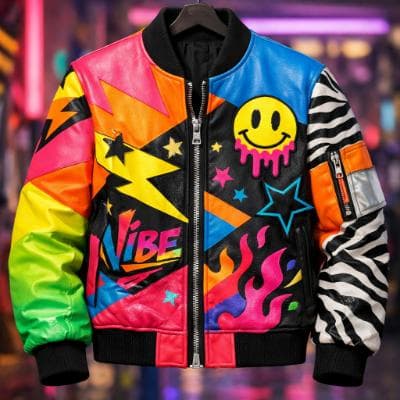
Make an ad for Splash Jackets. Feature the attached jacket and logo.
Attached assets

Why EasyVid Outperforms Neural Frames
Audio-reactive visuals vs. a narrative
Neural Frames excels at visuals that pulse and morph with the music, driven by each stem. EasyVid builds a music video as a story: it writes or formats a script into scenes with characters and locations, generates each scene and animates it.
The same characters in every scene
EasyVid turns every character, location and prop into a reusable asset, including variants for different outfits, lighting and camera angles. The artist or characters in the video keep the same face and look from the first scene to the last.
One visual style across the whole video
Pick a style such as Photorealistic, Anime, 3D Animation, Claymation or a custom one, and every scene is generated in it. You choose the video model for each scene, such as Seedance or MiniMax, and add your own track as background music.
Why Neural Frames Users Try EasyVid
Songs that tell a story
Artists whose lyrics follow characters through events get scenes that show those events instead of abstract motion.
Stylized narrative videos
Anime, cartoon and 3D animation styles suit story-driven music videos and animated shorts.
Beyond music videos
The same project flow also makes short films, animated stories and narrative YouTube videos with character voices and subtitles.